-
Introduction
This is a two-part post in which I will share my personal benchmarking results from MongoDB 3.6 to 8.0.
The idea of breaking the articles into different parts was to make the reading more dynamic. In this first part, I will explain more about the reasons and how the process was done, while Part 2 will focus on the results themselves.
If you want to jump to Part 2, you can click on the link below. Otherwise, you can follow along with this first part for more details and to understand the objective, test suite, and how the benchmark was performed.
-
Objective
The objective and motivation are pretty simple, I would say:
Understand If the Mongo database performance has changed over the years(releases).
That’s because this question is refreshed with every new major release; Customers always get in contact, sharing their concerns about possible performance regression when moving to a newer release.
Although it’s not very clear and organized the way this information is presented, we do have other users performing benchmarks and reporting related issues about performance loss when moving over the releases:
- MongoDB 4.2 vs 4.0, 3.6, 3.4, and 3.2 Benchmarks
- MongoDB 3.4 vs 4.4 vs 5.0 vs 6.0
- SERVER-51104
- SERVER-36875
- Performance degradation after upgrading to 4.4
That being said, this benchmark test aims to address these concerns by evaluating the performance of different MongoDB versions in a controlled and single environment.
While this test is not intended to be the definitive word on MongoDB performance, it aims to serve as a well-organized effort to illuminate that matter across all the tested versions, contributing to a broader conversation about it.
-
Test Suite
Database server with the following configuration profile:
- CPU: AMD Ryzen(TM) 7 5800X — 8C/16T
- RAM: 16 GB DDR4 at 3200 MHz (2 x 8 GB).
- Disks: 512GB(SSD) -> OS and Database installation. | 512GB(NVMe) -> MongoDB dbpath.
- OS: Oracle Linux 8.10.
- Kernel: 4.18.0–553.el8_10.x86_64
For the Client server, it had the following configuration profile:
- CPU: Intel(R) Core(TM) i7–9750H CPU
- RAM: 32 GB DDR4 at 2666 MHz (2 x 16 GB).
- OS: Oracle Linux 8.10.
- Kernel: 4.18.0–553.el8_10.x86_64
-
Topology
Single-node Replica Set.
This topology was chosen because the focus isn’t on replication latency, flow control, scattered gather queries, secondary reads, or any other features that could influence raw performance. Instead, the objective is to evaluate how MongoDB’s performance has changed across different versions without the influence of additional complexities.
-
Configuration
On the OS side for the database, all the production notes and best practices were applied accordingly:
- Production Notes for Self-Managed Deployments
- Operations Checklist for Self-Managed Deployments
- MongoDB Best Practices
|
1 2 3 4 5 6 7 8 9 10 11 12 13 14 15 16 17 18 19 20 21 22 23 24 25 26 27 28 29 30 31 32 33 34 35 36 37 38 39 40 41 42 43 44 45 46 47 48 49 50 51 52 53 54 55 56 57 58 59 60 61 62 63 64 65 66 67 68 69 70 71 72 73 74 75 76 77 78 79 80 81 82 83 84 85 86 87 88 89 90 91 92 93 94 95 96 97 98 99 100 101 102 103 |
# Percona Toolkit System Summary Report ###################### Date | 2024-10-06 16:25:22 UTC (local TZ: -03 -0300) Hostname | pc-oraclelinux8 Uptime | 2 days, 12 min, 3 users, load average: 0.00, 0.00, 0.02 System | Gigabyte Technology Co., Ltd.; X570S I AORUS PRO AX; v-CF (Desktop) Platform | Linux Release | Red Hat Enterprise Linux release 8.10 (Ootpa) Kernel | 4.18.0-553.el8_10.x86_64 Architecture | CPU = 64-bit, OS = 64-bit Threading | NPTL 2.28 SELinux | Disabled Virtualized | No virtualization detected # Processor ################################################## Processors | physical = 1, cores = 8, virtual = 16, hyperthreading = yes Speeds | 1x3614.310, 15x3800.000 Models | 16xAMD Ryzen 7 5800X 8-Core Processor Caches | 16x512 KB # Memory ##################################################### Total | 15.5G Free | 1.3G Used | physical = 9.1G, swap allocated = 7.8G, swap used = 3.0M, virtual = 9.1G Shared | 76.1M Buffers | 5.1G Caches | 6.2G Dirty | 140 kB UsedRSS | 10.0G Swappiness | 1 DirtyPolicy | 15, 5 DirtyStatus | 0, 0 Numa Nodes | 1 Numa Policy | default Preferred Node | current Node Size Free CPUs ==== ==== ==== ==== node0 15913 MB 1374 MB 0 1 2 3 4 5 6 7 8 9 10 11 12 13 14 15 Locator Size Speed Form Factor Type Type Detail ========= ======== ================= ============= ============= ======================================== DIMM 1 8 GB 3200 MT/s DIMM DDR4 Synchronous Unbuffered (Unregistered) DIMM 1 8 GB 3200 MT/s DIMM DDR4 Synchronous Unbuffered (Unregistered) DIMM 0 {EMPTY} Unknown Unknown Unknown DIMM 0 {EMPTY} Unknown Unknown Unknown # Mounted Filesystems ######################################## Filesystem Size Used Type Opts Mountpoint /dev/mapper/ol_oraclelinux8-home 387G 1% xfs rw,noatime,attr2,inode64,logbufs=8,logbsize=32k,noquota /home /dev/mapper/ol_oraclelinux8-root 70G 14% xfs rw,relatime,attr2,inode64,logbufs=8,logbsize=32k,noquota / /dev/nvme0n1p1 96M 33% vfat rw,relatime,fmask=0077,dmask=0077,codepage=437,iocharset=ascii,shortname=winnt,errors=remount-ro /boot/efi /dev/nvme0n1p2 1014M 46% xfs rw,relatime,attr2,inode64,logbufs=8,logbsize=32k,noquota /boot /dev/nvme1n1 466G 2% xfs rw,noatime,attr2,inode64,logbufs=8,logbsize=32k,noquota /mnt/nvme-mongodb # Disk Schedulers And Queue Size ############################# dm-0 | 128 dm-1 | 128 dm-2 | 128 nvme0n1 | [mq-deadline] 256 nvme1n1 | [mq-deadline] 256 # Kernel Inode State ######################################### dentry-state | 157146 131332 45 0 76070 0 file-nr | 7488 0 1617863 inode-nr | 80659 633 # Network Config ############################################# Controller | Intel Corporation Ethernet Controller I225-V (rev 01) FIN Timeout | 30 Port Range | 60999 # Simplified and fuzzy rounded vmstat ######################## procs ---swap-- -----io---- ---system---- --------cpu-------- r b si so bi bo ir cs us sy il wa st 1 0 0 0 1 70 1 7 1 0 99 0 0 7 0 0 0 0 0 5000 4500 1 1 98 0 0 0 0 0 0 0 4 3000 3000 1 0 99 0 0 0 0 0 0 0 0 400 500 0 0 100 0 0 0 0 0 0 0 0 300 450 0 0 100 0 0 $ sudo blockdev --getra /dev/mapper/ol_oraclelinux8-home 16 $ sudo blockdev --getra /dev/nvme1n1 16 $ cat /proc/$(pgrep mongod)/limits Limit Soft Limit Hard Limit Units Max cpu time unlimited unlimited seconds Max file size unlimited unlimited bytes Max data size unlimited unlimited bytes Max stack size 8388608 unlimited bytes Max core file size 0 unlimited bytes Max resident set unlimited unlimited bytes Max processes 64000 64000 processes Max open files 64000 64000 files Max locked memory unlimited unlimited bytes Max address space unlimited unlimited bytes Max file locks unlimited unlimited locks Max pending signals 127401 127401 signals Max msgqueue size 819200 819200 bytes Max nice priority 0 0 Max realtime priority 0 0 Max realtime timeout unlimited unlimited us |
On the Database side, the instance is running with default parameters with only Replica Set and Authorization enabled:
|
1 2 3 4 5 6 7 8 9 10 11 12 13 14 15 16 17 18 19 20 21 22 23 24 25 26 27 28 29 30 31 32 33 34 35 36 37 |
rs0:PRIMARY> db.adminCommand({ getCmdLineOpts: 1 }) { "argv" : [ "/usr/bin/mongod", "-f", "/etc/mongod.conf" ], "parsed" : { "config" : "/etc/mongod.conf", "net" : { "bindIp" : "127.0.0.1, 192.168.15.50", "port" : 27017 }, "processManagement" : { "fork" : true, "pidFilePath" : "/var/run/mongodb/mongod.pid", "timeZoneInfo" : "/usr/share/zoneinfo" }, "replication" : { "replSetName" : "rs0" }, "security" : { "authorization" : "enabled", "keyFile" : "/mnt/nvme-mongodb/keys/keyfile" }, "storage" : { "dbPath" : "/mnt/nvme-mongodb/data", "journal" : { "enabled" : true } }, "systemLog" : { "destination" : "file", "logAppend" : true, "path" : "/var/log/mongodb/mongod.log" } } |
-
Benchmarking tool
The tool used for this test was the mongo-perf.
- Driver version — PyMongo 4.4.0.
- Python version — Python3.8.
As per the Compatibility documentation, PyMongo 4.4.0 and Python3.8 provide all the necessary compatibility needed from 3.6 to 8.0.
The mongo-perf tool utilizes Python scripts to conduct specific test runs that evaluate various aspects of performance. Currently, around 34 test case scripts are available for use, but I did not use all of them.
For the tests, the following scripts were selected:
- simple_insert.js
- simple_update.js
- simple_query.js
- simple_remove.js
- complex_insert.js
- complex_update.js
- partial_index.js
The choice of those selected scripts is because they can comprehensively test the basics of CRUD operations.
The simple_insert.js, simple_update.js, simple_query.js, and simple_remove.js cover the basics of document creation, modification, retrieval, and deletion. The complex_update.js adds complexity by involving advanced operations and multiple indexes. complex_insert.js and partial_index.js evaluate performance under more demanding scenarios, such as sequential and random inserts, with and without contention, involving large values and multi-key indexes.
-
Methodology and Final Consideration
This test was conducted at the dawn of MongoDB 8.0’s release, and the latest available patch releases of the other versions were used accordingly:
- 3.6.23 -> 4.0.28 -> 4.2.25 -> 4.4.29 -> 5.0.29 -> 6.0.18 -> 7.0.14 -> 8.0.0.
Red Hat 8 was chosen as the system exclusively due to its high compatibility across the tested versions. Later in this section, I further detail the tests, but below, we have a diagram showing how the MongoDB versions were tested.
- Each release was tested following the upgrade patch approach:
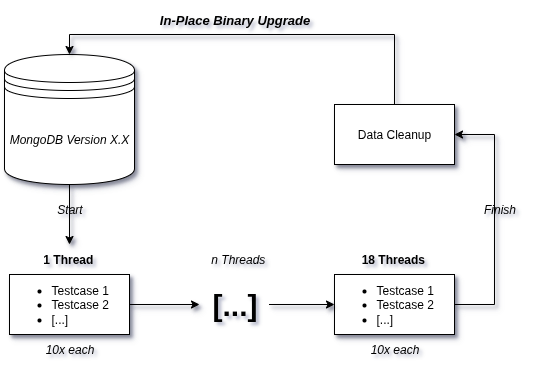
Here, it’s how the benchmark process took place:
|
1 2 3 4 5 6 7 8 9 10 11 12 13 14 15 16 17 18 19 20 21 22 23 |
#!/usr/bin/bash tests=("simple_insert" "simple_remove" "simple_update" "complex_insert" "complex_update" "partial_index") threads=(1 2 4 8 16) # Run the main set of tests for t in "${tests[@]}"; do for th in "${threads[@]}"; do for i in {1..10}; do echo "==== Test $t with $th threads, Round $i ====" python3.8 -u benchrun.py -f testcases/$t.js -- host 192.168.15.70 -- port 27017 -- replset rs0 -u admin -p sekret -t $th -- trialTime 1 -- out /home/jean/benchtools/results/8.0-$t-$th-$i.json -- tsvSummary true -- writeCmd true -- readCmd true -w 1 done done done # Run the separate test with simple_query.js and -- includeFilter core echo "==== Running simple_query.js with core filter ====" for th in "${threads[@]}"; do for i in {5..10}; do echo "==== Test simple_query with $th threads, Round $i ====" python3.8 -u benchrun.py -f testcases/simple_query.js -- host 192.168.15.70 -- port 27017 -- replset rs0 -u admin -p sekret -t $th -- trialTime 1 -- out /home/jean/benchtools/results/8.0-simple_query-$t-$th-$i.json -- tsvSummary true -- writeCmd true -- readCmd true -w 1 -- includeFilter core done done |
It’s a shell script that interacts with the testcases from the mongo-perf tool as listed before; From the benchmark tool, worth mentioning are the options used:
-t $th:
- This defines the number of threads to use in the benchmark.
- The $th variable is dynamically replaced by values in the loop (e.g., 1, 2, 4, 8, 16).
-trialTime 1:
- This defines the duration of each trial in seconds; In the test, each trial runs for 1 second.
-writeCmd true:
- This enables the use of write commands (e.g., insert, update, delete) instead of legacy write operations.
- MongoDB introduced write commands in newer versions for more efficient write operations.
-readCmd true:
- This enables the use of read commands (e.g., find, getMore) instead of legacy read operations.
-w 1:
- Specifies the write concern level.
As a summary for the script, each CRUD test ran ten times for the number of threads given(1, 2, 4, 8, 16) for the duration of one second.
- For example: The simple_insert.js is a script that tests different inserts operations, each of those operations ran for 1 second, 10 times using 1 thread. After finishing that sequence of operations, the loop restarts, but this time the operations for simple_insert.js will be tested with 2 threads, then 4 and so on until it extinguishes the thread variable.
After executing all the CRUD scripts mentioned for a release, a data cleanup was performed. For each operation tested, we will have 10 distinct outputs. The outliers (the fastest and slowest) were removed, and the other 8 remaining operations are summed up and divided, generating an average of values for that operation.
- For example: The simple_insert.js has the operation Insert.EmptyCapped, which basically tests the Insertion of an empty document into a capped collection. We then have 10 distinct execution times running with 1 thread: 547.96, 552.54, 561.64, 562.18, 562.73, 564.83, 567.14, 570.20, 542.68, 567.62. The outliers would the highest number = 570.20 and the lowest number = 542.68; The average operations per second would be 560.83.
This calculation was applied to all operations for all threads and was organized into tables, which you can see and follow in part 2, where we have the finalized report.
See you there!